1. Home
  2. Projects
  3. Campus Lost & Found API

Backend & DevOps · Solo project

Campus Lost & Found API

A REST API for a university's lost-and-found service, with a full CI/CD pipeline that tests, scans, builds and deploys every release to AWS using blue/green deployment.

  • Team Solo project
  • Course Continuous Integration, UAS Technikum Wien
  • Result Zero downtime during release
  • 20/20 unit tests passing
  • 86% test coverage
  • 4.33 ms p95 response time under load
  • 0 known vulnerable dependencies

The assignment

Build the backend for a campus lost-and-found service and practise DevOps: a cloud-hosted pipeline with at least five stages, code quality and security scanning, feature toggles, and blue/green deployment on AWS.

  • Public read, write protected by a hashed API key
  • Paginated list with full-text search and sorting
  • Feature toggle in PostHog, no redeploy needed
  • SonarQube self-hosted on AWS, Snyk security scans
  • Docker images pushed to Docker Hub
  • Blue/green deployment on EC2 with RDS PostgreSQL
  • k6 load test on staging before the traffic switch
  • Failed stages stop the pipeline and send an email

What it does

  • API key access

    Creating, updating and deleting items needs a key. Keys are stored as SHA-256 hashes and can be rotated.

  • Public search

    Anyone can list items with pagination, newest or oldest first, and PostgreSQL full-text search.

  • Feature toggle

    Full-text search can be switched off in PostHog and the running server follows straight away.

  • Safe releases

    A new version is tested on the idle environment before NGINX moves traffic to it.

The pipeline

GitHub Actions. A push to main runs the first three stages; a push to deploy/production runs all of them.
  1. Quality & security SonarQube, Snyk
  2. Test Jest with coverage
  3. Build Docker image
  4. Deliver Push to Docker Hub
  5. Deploy To the idle environment
  6. Load test k6 on staging
  7. Switch Blue/green traffic
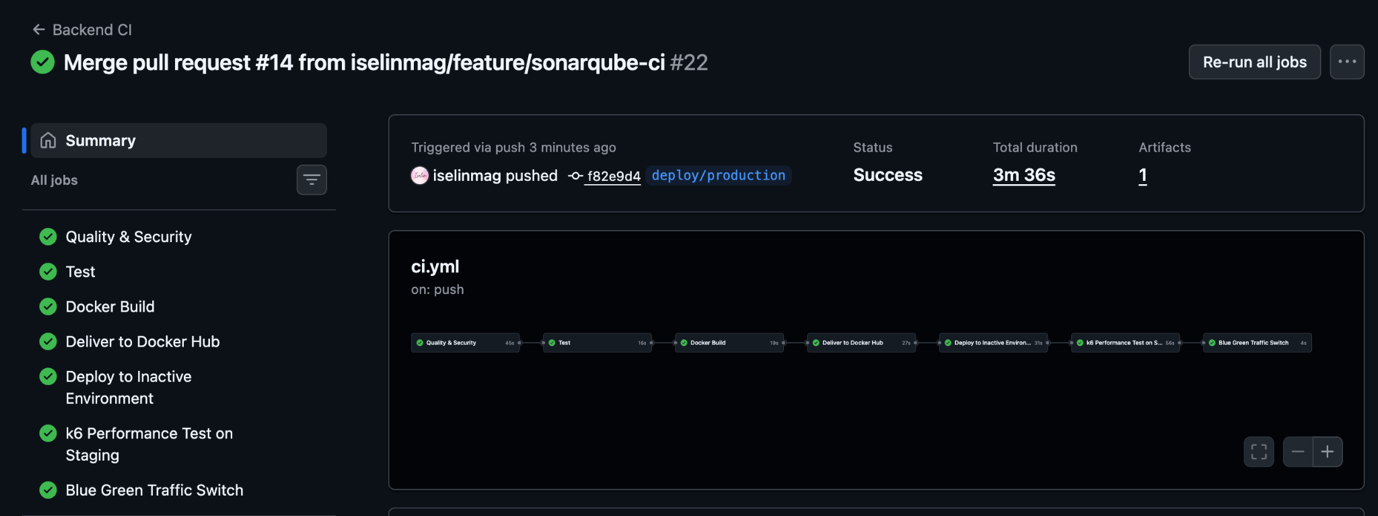
GitHub Actions run with all seven stages green, from Quality & Security to Blue Green Traffic Switch
A full deploy/production run in GitHub Actions, all stages green in 3 min 36 s.

How it is built

Application

  • Node.js 22 and Fastify 5
  • PostgreSQL full-text search with to_tsvector and plainto_tsquery
  • Jest tests that simulate requests without a real server or database
  • Config through environment variables, secrets in GitHub

Infrastructure

  • Blue and green Fastify containers on one EC2 instance
  • NGINX in front decides which one gets traffic
  • AWS RDS PostgreSQL, only reachable from the app's security group
  • Automatic rollback if the new NGINX config fails
  • Node.js
  • Fastify
  • PostgreSQL
  • Docker
  • NGINX
  • AWS EC2
  • AWS RDS
  • GitHub Actions
  • Jest
  • k6
  • SonarQube
  • Snyk
  • PostHog

Proof it works

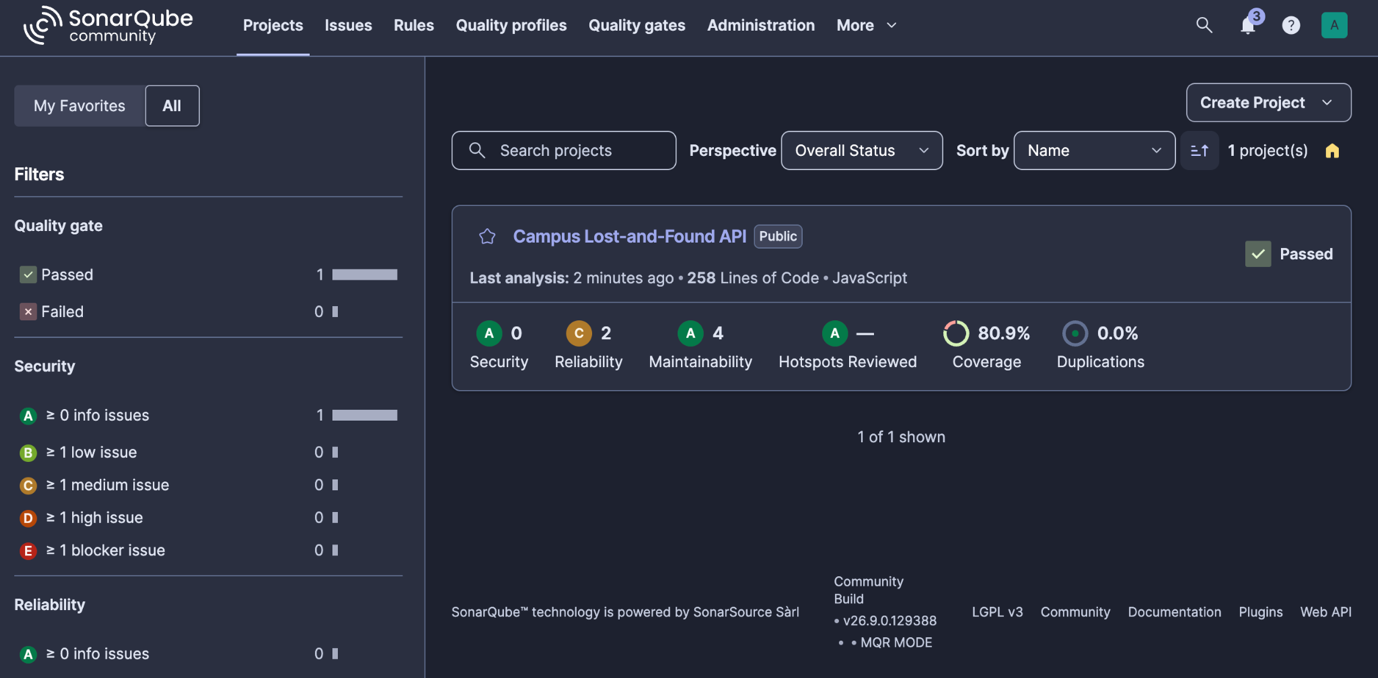
SonarQube overview: Quality Gate passed, 80.9% coverage and 0.0% duplicated code
SonarQube: Quality Gate passed, 0.0% duplicated code.
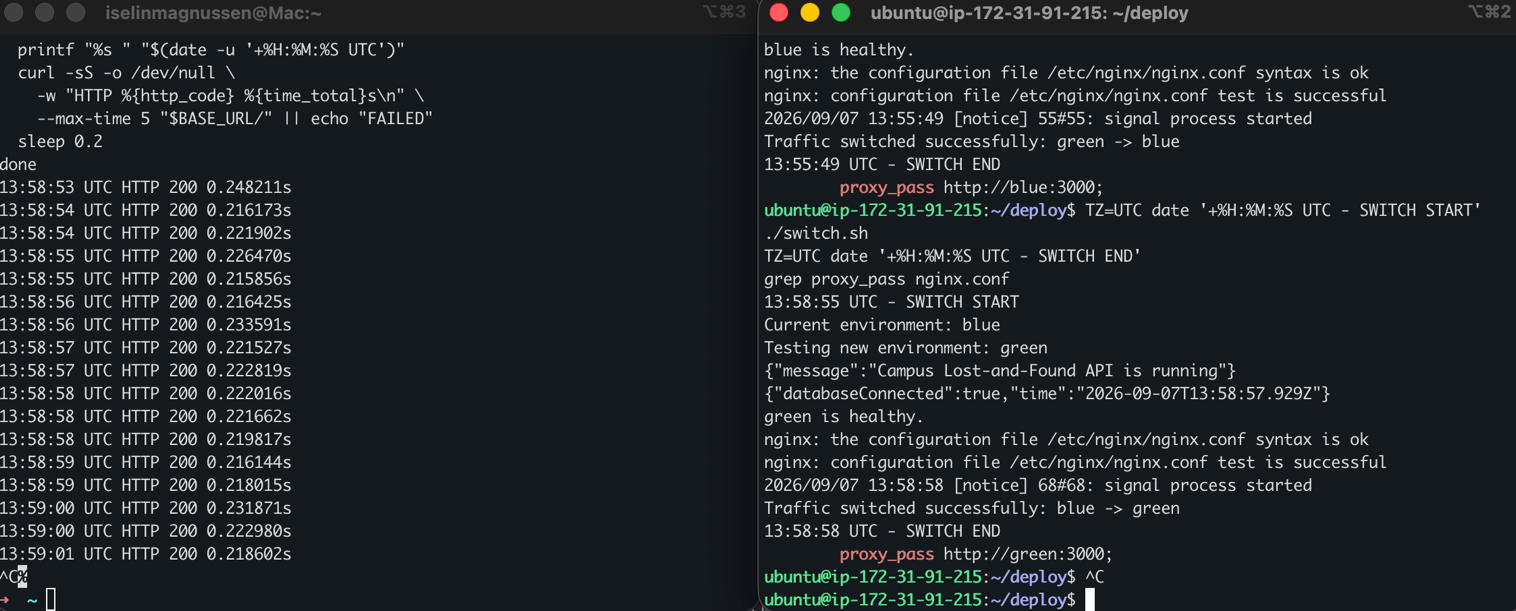
Two terminals: on the left every request returns HTTP 200, on the right switch.sh moves traffic from blue to green
Requests kept returning HTTP 200 while traffic switched from blue to green.

Challenges & what I learned

Releasing a new version without taking the API down

Problem
A normal redeploy stops the running container, so every request during the restart fails.
What I chose
Two containers, blue and green, behind NGINX. The pipeline deploys to the idle one, waits for its health check and runs a k6 load test against it. Only then does a script point NGINX at it and reload.
Why
The live version keeps serving traffic the whole time. The script validates the new NGINX config first and restores the old one if it fails, and the old container stays up as a fallback. While switching, a client sent requests nonstop, and every one returned HTTP 200.
Back to all projects